CHEXX App and Mobile Casino: PWA, Desktop Access and Telegram
CHEXX does not use a native iOS App Store or Google Play gambling app in the current product model. Mobile access is through the website and an installable progressive web app, while Telegram Mini Apps provide another access route. The available CHEXX information also lists PWA/desktop clients. For a Philippine user searching “CHEXX app,” that distinction matters because similarly named app-store results should not be assumed to be the casino. For a broader view of the brand, see the CHEXX Philippines review.
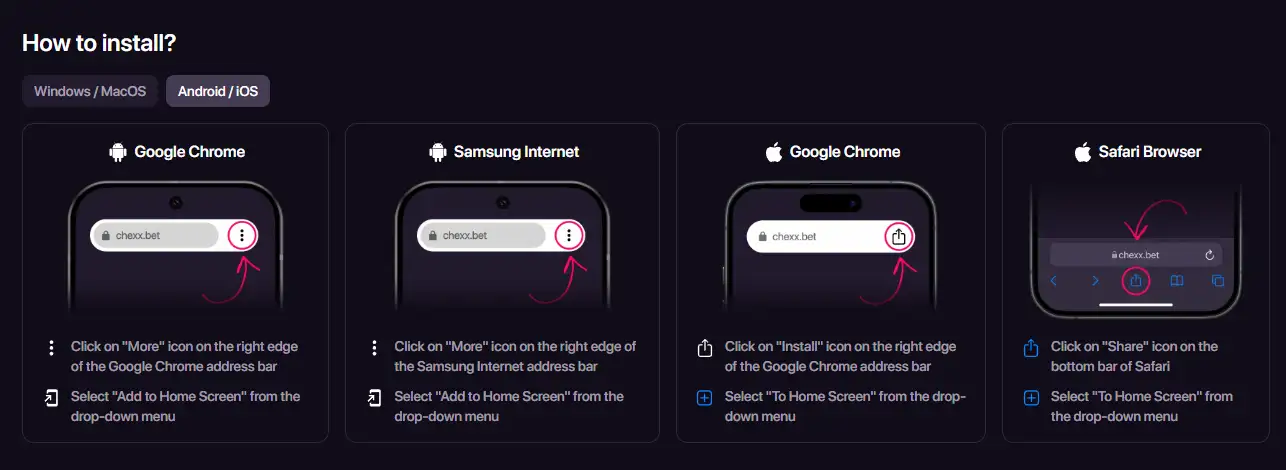
The current CHEXX PWA page provides installation instructions for Android, iOS, Windows, and macOS browsers, including home-screen or dock installation. A PWA can launch in an app-like way from your device, but this page does not claim offline gambling, guaranteed performance, or any unverified native-store features. The full picture is in our CHEXX review for the Philippines.
CHEXX app options at a glance
| Access route | What it is | What it is not |
|---|---|---|
| Mobile website | Browser-based CHEXX access | Not a native app-store download |
| PWA | Installable web app launched from the home screen or desktop | Not a separate native iOS or Android store build |
| Desktop access | PWA/desktop client model in the available CHEXX information | Not proof of an unrelated third-party desktop package |
| Telegram Mini Apps | Gaming access through Telegram | Not the same thing as the CHEXX support bot |
What a PWA actually changes
A progressive web app is a website that can be installed or pinned so it behaves more like an app launcher. Instead of finding CHEXX in a native mobile store, you open the official site in a supported browser and use the browser’s install or home-screen option. The resulting icon gives you a direct route back to the web application.
The current CHEXX PWA instructions show an “Add to Home Screen” style flow on mobile and installation options on desktop browsers. The official page also lists Chrome across Android, iOS, Windows, and macOS, plus Safari on iOS and macOS and Samsung Internet on Android. These are browser installation paths, not evidence of a native gambling app in Apple or Google’s stores.
That difference matters for expectations. A native app is distributed as a platform-specific package through an app store. A PWA is delivered through the web and installed by the browser. Both can create a home-screen icon, but they are different distribution models. If an app-store listing claims to be CHEXX, the name alone is not enough to prove it is the casino product.
This page also avoids assuming features that have not been established in the available information. It does not promise offline play, background operation, a particular push-notification behavior, faster betting, lower latency, or superior game performance. Those details can depend on browser capabilities, device configuration, network connection, and the current CHEXX implementation.
How to install the CHEXX PWA safely
The safest starting point is the official CHEXX web presence, not a search for APK files or similarly named apps. Open the official site in your browser, navigate to the PWA installation option, and use the browser-provided install or home-screen control.
- Open the official CHEXX site in a supported browser.
- Find the CHEXX app or PWA installation option on the site.
- Use the browser’s install, “Add to Home Screen,” or equivalent control.
- Confirm that the installed item opens the same official CHEXX web application.
- Do not sideload an APK or third-party package merely because it uses the CHEXX name.
On iPhone and iPad, the process is still a browser installation flow rather than an App Store gambling app. On Android, it is likewise a browser-based PWA route rather than a Google Play casino listing. On desktop systems, the CHEXX PWA page provides browser installation instructions for Windows and macOS environments.
Why this matters for search results
App stores contain products with overlapping names, and search engines can surface unrelated listings. A logo, app title, or similar spelling is not enough to establish ownership. Start from CHEXX’s official website and follow its own installation path rather than working backwards from an app-store result.
Mobile browser use versus installed PWA use
You do not need to install the PWA simply to understand the CHEXX mobile product model. The website itself is one of the verified ways to use CHEXX. The PWA mainly changes how you launch that web experience: it can be opened from a device icon instead of first navigating through browser bookmarks or search results.
That can reduce navigation friction, but it should not be oversold. An installed icon does not change the legal status of the service, does not guarantee that every game will behave identically on every device, and does not eliminate the need for a stable internet connection during live gambling activity. The available information do not support claims of offline casino play.
If you switch devices, treat the new device as a fresh security environment. Use the official site again, check the address, and install from there rather than copying a package from another device. This is a basic anti-impersonation habit and is especially useful for gambling services, where an imitation app can target login credentials or payment details.
Telegram Mini Apps are a gaming route, not the support bot
CHEXX’s approved product data lists Telegram Mini Apps as one of the ways to play. That is distinct from the support channel identified as @ChexxSupportBot. The functional separation is straightforward: the Telegram Mini App is part of the gaming access model, while @ChexxSupportBot is a support contact.
That distinction prevents a common source of confusion. Telegram bots can look similar in the interface, and handles can be imitated. Do not assume that a support bot is the place to launch games, and do not assume that any bot using the CHEXX name is official. Begin from the official CHEXX site or an already verified CHEXX channel when moving into Telegram.
Telegram access also should not be treated as a replacement for normal account safety. Protect your Telegram account, avoid sharing one-time codes, and verify the destination before entering credentials or following payment instructions. A convenient access route still sits inside the same account and payment risk model as the website.
Desktop access is separate from the mobile question
The available CHEXX information groups PWA/desktop clients alongside the website and Telegram Mini Apps. The current PWA page also provides desktop browser installation instructions for Windows and macOS. That means a user looking for a desktop experience does not need to treat mobile app stores as the source of truth.
On desktop, the same identity check applies: use CHEXX’s official web presence and its official browser installation flow. Avoid downloading executables from review sites, file mirrors, chat messages, or unverified repositories. This guide does not endorse third-party installers or claim that an unrelated desktop package is official simply because it carries CHEXX branding.
The practical value of desktop installation is organization. It gives the web product a dedicated launcher and can make it easier to return to the same official destination. It should not be presented as a guarantee of better odds, faster withdrawals, lower wagering requirements, or different account rules.
What happens after you open CHEXX on mobile
Access method is only the first step. Registration, identity checks, deposits, and withdrawals remain separate processes. Whether you open CHEXX in a browser, from a PWA icon, or through a Telegram Mini App, you should not assume that account or cashier rules change because the interface changed.
For sign-up details, use the CHEXX registration guide. It covers the account-opening path without turning this mobile page into a registration walkthrough. For funding choices, the CHEXX payments guide explains the crypto-only cashier model and why PHP is not a direct supported cashier currency in the available CHEXX information.
This separation is useful on a phone because small screens can make it tempting to treat every next step as part of one app flow. In reality, account creation, wallet selection, network matching, and any verification request are distinct decisions that deserve their own checks.
Mobile access for casino and sportsbook use
The CHEXX product covers casino and sports betting, so mobile access is relevant beyond slot play. The same browser/PWA model can lead into different product sections without turning each section into a separate native app. That reduces the need to search for a dedicated “CHEXX sportsbook app” or “CHEXX casino APK.”
If sports betting is your primary use case, the CHEXX sportsbook guide covers the betting product itself. This page stays with distribution and access because that is the question behind searches for the CHEXX app.
Do not infer that mobile access changes market availability, bet settlement, game rules, or limits. Those are product-level details. The app format only explains how you reach CHEXX from a device.
Philippine users should separate access from authorization
Being able to open a gambling website or install its PWA does not establish that the operator is locally licensed in the Philippines. Technical access and regulatory authorization are separate questions. A mobile guide should therefore avoid implying that a working PWA is proof of local approval.

The site’s CHEXX trust guide handles operator and verification questions separately. That distinction is especially important when a product is available globally through web technologies, because browser access can cross borders more easily than local licensing frameworks do.
Use the mobile page to answer “how can I access CHEXX from this device?” Use the trust and local compliance pages to answer “what regulatory status applies?” Keeping those questions separate produces a more accurate decision than treating availability as legitimacy.
Security checklist for a CHEXX app search
- Start from the official CHEXX website rather than an app-store search result.
- Use the browser’s PWA installation flow instead of downloading an unverified APK.
- Check that the PWA opens the same official CHEXX web application.
- Keep gaming access in Telegram separate from @ChexxSupportBot, which is a support channel.
- Do not enter wallet credentials, recovery phrases, or one-time codes into a third-party installer.
- Recheck the destination after redirects, copied links, or messages from unknown accounts.
These steps are more important than whether an icon looks polished. Impersonation works by copying visual identity, while the real trust signal is the route you used to reach the product. The official-site-first habit is therefore the simplest way to resolve app-store naming confusion.
What to do when the install option is missing
If the browser does not show the same installation control described on CHEXX’s PWA page, do not solve the problem by downloading an unknown package. Browser support can differ by device, operating system, and browser version. The safe fallback is to use the official CHEXX website directly in the browser and recheck the official PWA instructions for your platform.
An installation shortcut is optional access convenience, not a requirement for account ownership. A missing icon does not justify giving a third-party installer access to your device, wallet, or credentials. This distinction is particularly useful on older phones or managed devices where the browser may restrict PWA installation even though ordinary web access still works.
Bottom line: CHEXX is web/PWA first
For users in the Philippines, the key answer is that CHEXX is not a native App Store or Google Play gambling app in the current product model. Use the mobile website or install the CHEXX PWA from the official site. Telegram Mini Apps provide another gaming access route, while the CHEXX support bot has a separate support function.
The PWA can provide a home-screen or desktop-style launcher without becoming a native store application. That is the right mental model for a CHEXX app search. Verify the official web destination first, install only through the official browser flow, and keep registration, payments, sportsbook use, and regulatory checks as separate decisions after access is established. An account comes first: registration.
Bookmarking the verified web destination can also reduce repeat search confusion. When returning later, use that saved route or the PWA shortcut created from it instead of searching an app marketplace again. This keeps the access path consistent while leaving account, payment, and regulatory checks to their dedicated guides.








 Vegas Strip BlackjackClassic
 Perfect Pairs BlackjackSide Bet
 European BlackjackMultihand
 Vegas Downtown Blackjack GoldGold Series
 Blackjack Lucky LadiesSide Bet
 Double Exposure BlackjackDouble Exposure
 Classic BlackjackClassic
 Atlantic City BlackjackClassic
 Blackjack Surrender OriginsSurrender
 Multihand BlackjackMultihand
 Premier Blackjack with Side BetsSide Bet
 Ultimate Blackjack with RachaelLive-style
 Blackjack 21 ClassicClassic
 Quantum Blackjack PlusMultiplier
 American BlackjackClassic
 Multifire RouletteMultiplier
 Mega Fire Blaze RouletteMultiplier
 Monopoly Roulette TycoonThemed
 Dragon RouletteThemed
 Roca Riches RouletteThemed
 Lucky RouletteClassic
 RouletteRelax Gaming
 American RouletteClassic
 Gold RouletteGold Series
 Quantum RouletteMultiplier
 Immortal Romance RouletteThemed
 Mini Roulette 3DMini
 Auto RouletteSwitch Studios
 Double Ball American RouletteDouble Ball
Published by the Chexx Casino team.